
Electron Development Run Failed
Solution pnpm exec node node_modules/electron/install.js
Mysql Quick Export Command
Command Template {mysqldump_bin} --opt --hex-blob --skip-lock-tables --single-transaction --routines --events --skip-triggers --default-character-set='{db_charset}' --force --host='{db_host}' --port={db_port} --user='{db_user}' --password='{db_password}' '{db_name}'Parameter Explanation{mysqldump_bin} # mysqldump executable path (e.g., /usr/bin/mysqldump) --opt # Enables a series of optimization options (--add-drop-table, --add-locks, --create-options, --quick, etc.) --hex-blob # Exports binary fields (BLOB) in hexadecimal to prevent garbled text --skip-lock-tables # Skip table locking (avoid blocking other queries) --single-transaction # Export using single transaction (lock-free for InnoDB with good consistency) --routines # Export stored procedures and functions --events # Export event scheduler (EVENT) --skip-triggers # Skip trigger export --default-character-set='{db_charset}' # Specify character set, e.g., utf8mb4 --force # Continue execution even if errors occur --host='{db_host}' # Database host --port={db_port} # Database port --user='{db_user}' # Username --password='{db_password}' # Password '{db_name}' # Database name to exportUsage Example Export a database named mydb, MySQL running on localhost port 3306, character set utf8mb4, user root with password 123456: mysqldump --opt --hex-blob --skip-lock-tables --single-transaction --routines --events --skip-triggers \ --default-character-set='utf8mb4' --force \ --host='127.0.0.1' --port=3306 --user='root' --password='123456' 'mydb' > mydb.sql
Centos7 Upgrade GCC
Introduction This guide covers upgrading GCC on Centos7 using source code compilation, so you don't need to switch GCC environments after installation. 1. Switch to root user su yum -y install wget2. Download GCC source The following command will save to /usr/local/ wget http://ftp.gnu.org/gnu/gcc/gcc-4.9.2/gcc-4.9.2.tar.gz3. Extract the archive cd /usr/local/ tar -zxvf gcc-4.9.2.tar.gz4. Download compilation dependencies 4.1 If you have internet access cd gcc-4.9.2 ./contrib/download_prerequisites4.2 If you don't have internet access Download these packages on Windows:ftp://ftp.gnu.org/gnu/gmp/gmp-4.3.2.tar.bz2 http://www.mpfr.org/mpfr-2.4.2/mpfr-2.4.2.tar.bz2 http://www.multiprecision.org/mpc/download/mpc-0.8.1.tar.gzThen extract and move to gcc-4.9.2: tar -xjf gmp-4.3.2.tar.bz2 tar -xjf mpfr-2.4.2.tar.bz2 tar -xzf mpc-0.8.1.tar.gz mv gmp-4.3.2 gcc-4.9.2/gmp mv mpfr-2.4.2 gcc-4.9.2/mpfr mv mpc-0.8.1 gcc-4.9.2/mpc5. Compile and install GCC yum install -y gcc-c++ glibc-static gcc ./configure --prefix=/usr/local/gcc --enable-bootstrap --enable-checking=release --enable-languages=c,c++ --disable-multilib make make installCompilation Parameters--prefix=/usr/local/ Specify installation path --enable-bootstrap Use the first compiled program for second compilation --enable-checking=release Run consistency checks at software release standards --enable-languages=c,c++ Supported high-level languages and runtime libraries --disable-multilib Disable 32-bit code generation on 64-bit systemsConfigure Environment Variables 1. Check current gcc version gcc -v # gcc (GCC) 4.8.5 20120313 (Red Hat 4.8.5-16)2. Create environment variable script vim /etc/profile.d/gcc.sh # Add: export PATH=/usr/local/gcc/bin:$PATH3. Activate environment variables source /etc/profile.d/gcc.sh gcc -v # gcc (GCC) 4.9.2Export Header Files ln -sv /usr/local/gcc/include/ /usr/include/gccExport Library Files vim /etc/ld.so.conf.d/gcc.conf # Add: /usr/local/gcc/lib64 ldconfig -v ldconfig -p |grep gccNotes If your program was previously running on a gcc >= 4.9.2 environment, you can switch using: source /opt/rh/devtoolset-7/enable # or source scl_source enable devtoolset-7
Uniapp+tailwindcss+uview Start
Official Resources Website: https://weapp-tw.icebreaker.top/Template Projects Vue2 Template https://github.com/sonofmagic/uni-app-vue2-tailwind-vscode-template Vue3 Template https://github.com/sonofmagic/uni-app-vite-vue3-tailwind-vscode-template
AES CBC Mode Decryption Without IV
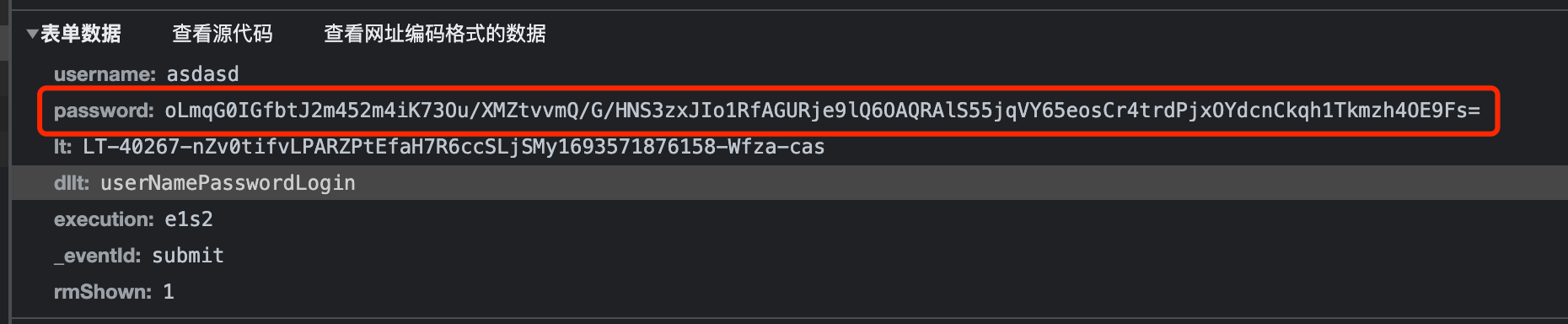
Problem AnalysisFirst, examine the request and find that the password is encryptedFollowing the code, discover it's AES encryption in CBC mode. The ciphertext is sent to the server, and the key is stored in the session. However, there's no IV (initialization vector).With only the key, the random IV only affects the first 64 bits of the result. You can see that 64 random characters are generated.Conclusion In AES CBC mode, if there's no IV (initialization vector), data can still be decrypted as long as you have the key. The IV's purpose is to ensure that identical plaintext produces different ciphertext in different encryption processes. Without an IV, using an all-zero IV for decryption works correctly.